Free Security Camera Apps Compared: What Do You Actually Get Without Paying? (2026)
Updated May 20, 2026
You can turn an old phone into a home security camera with apps like Oriel, Alfred Camera, AtHome, Security Camera CZ, WardenCam, Cawice, Swish Eye, or Watchful Cam. The important question is not whether the app is free to download. It is what still works after you set it up: live view, motion alerts, recording playback, camera limits, ads, and storage.
We compared the free tiers and paid limits of popular old-phone security camera apps, using official app listings, pricing pages, help-center docs, and current store data verified on May 20, 2026.
Disclosure: This comparison is published by the Oriel team. Oriel is included in the list. We evaluate each app against the same criteria and link to source pages where practical.
Key Takeaways
- Oriel is best for iPhone users who want the essentials without a subscription: live view, motion detection, recording playback, and multiple cameras.
- Security Camera CZ is the strongest Android-only free-tier option we found: its Google Play listing says the free and paid versions have the same features, with ads as the main difference.
- Alfred Camera is the market leader and the safest recommendation for mixed iOS + Android households that want the most mature ecosystem, but recording playback for newer users requires Premium.
- AtHome is the broadest platform option because it supports phones and PCs, but its product model is more complex because camera and viewer apps are separated.
- WardenCam is useful if you want recordings stored in your own Google Drive or Dropbox account.
- Cawice is a simple Android option with P2P streaming and Google Drive storage, but automatic recording and other stronger features sit behind Premium.
- Swish Eye has a clear free-tier timeout: one Google Play review reply from the developer says free users can watch live for 30 minutes straight, while Premium raises the limit.
- EyesPie should be removed from this article unless it returns to official stores. Current live searches show discontinued or third-party references, not a reliable official listing.
There is no single best free security camera app. Pick based on your device mix, whether you need playback without paying, and how comfortable you are with ads, subscriptions, or cloud storage.
How We Compared These Apps
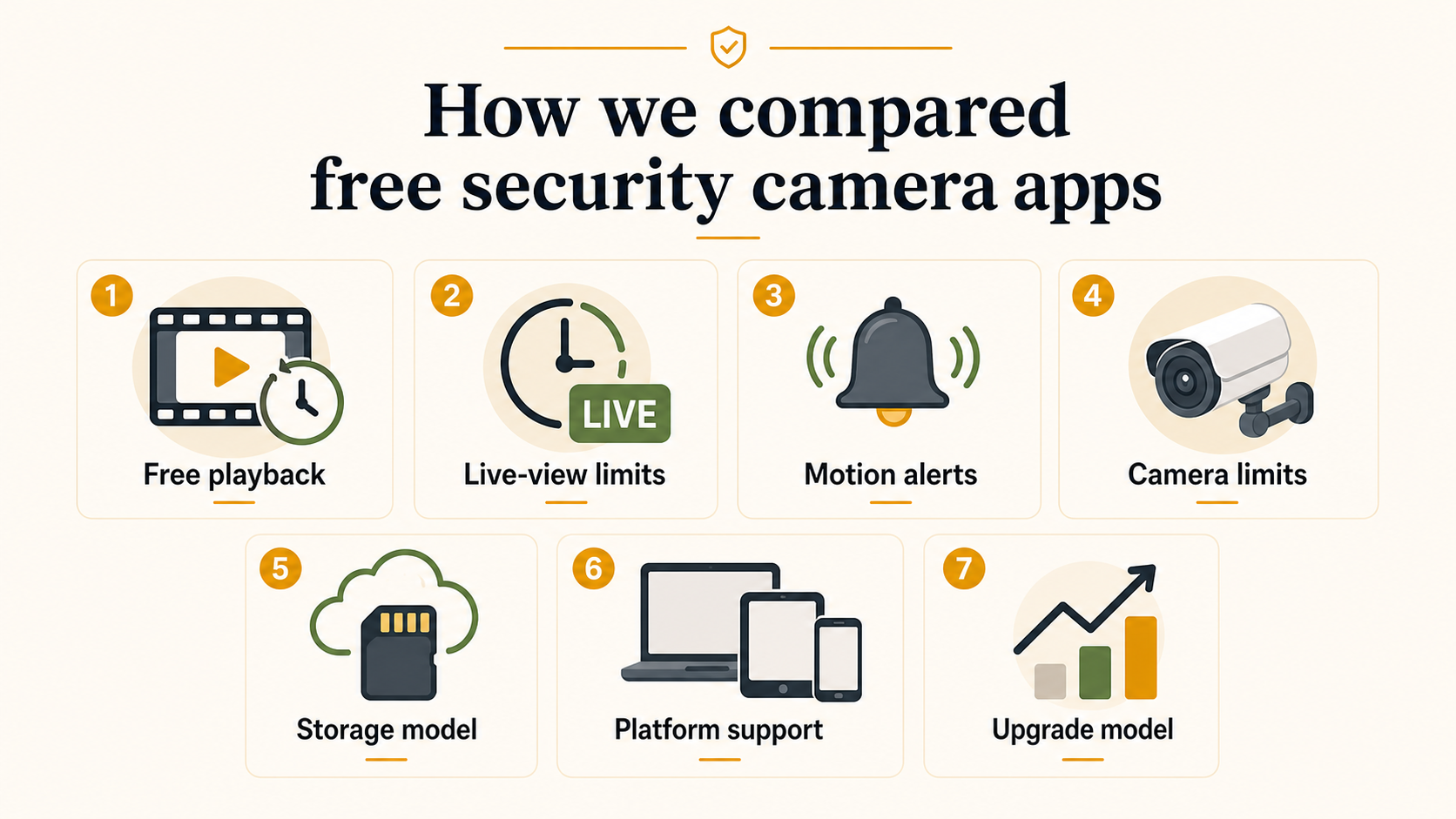
We looked at seven practical criteria:
- Free playback: Can you review recorded events without subscribing?
- Live-view limits: Does the app interrupt or time-limit viewing?
- Motion alerts: Are alerts included in the free tier?
- Camera limits: Can you use more than one camera without paying?
- Storage model: Local device, app cloud, user-owned cloud drive, or iCloud.
- Platform support: iOS, Android, Mac, Windows, or mixed-device support.
- Upgrade model: Subscription, one-time purchase, ads, or unclear paid tier.
We treated official app-store listings, official pricing pages, and developer docs as stronger sources than user reviews. User reviews are useful for edge cases, but they can be old, region-specific, or based on a previous version.
Quick Comparison Table
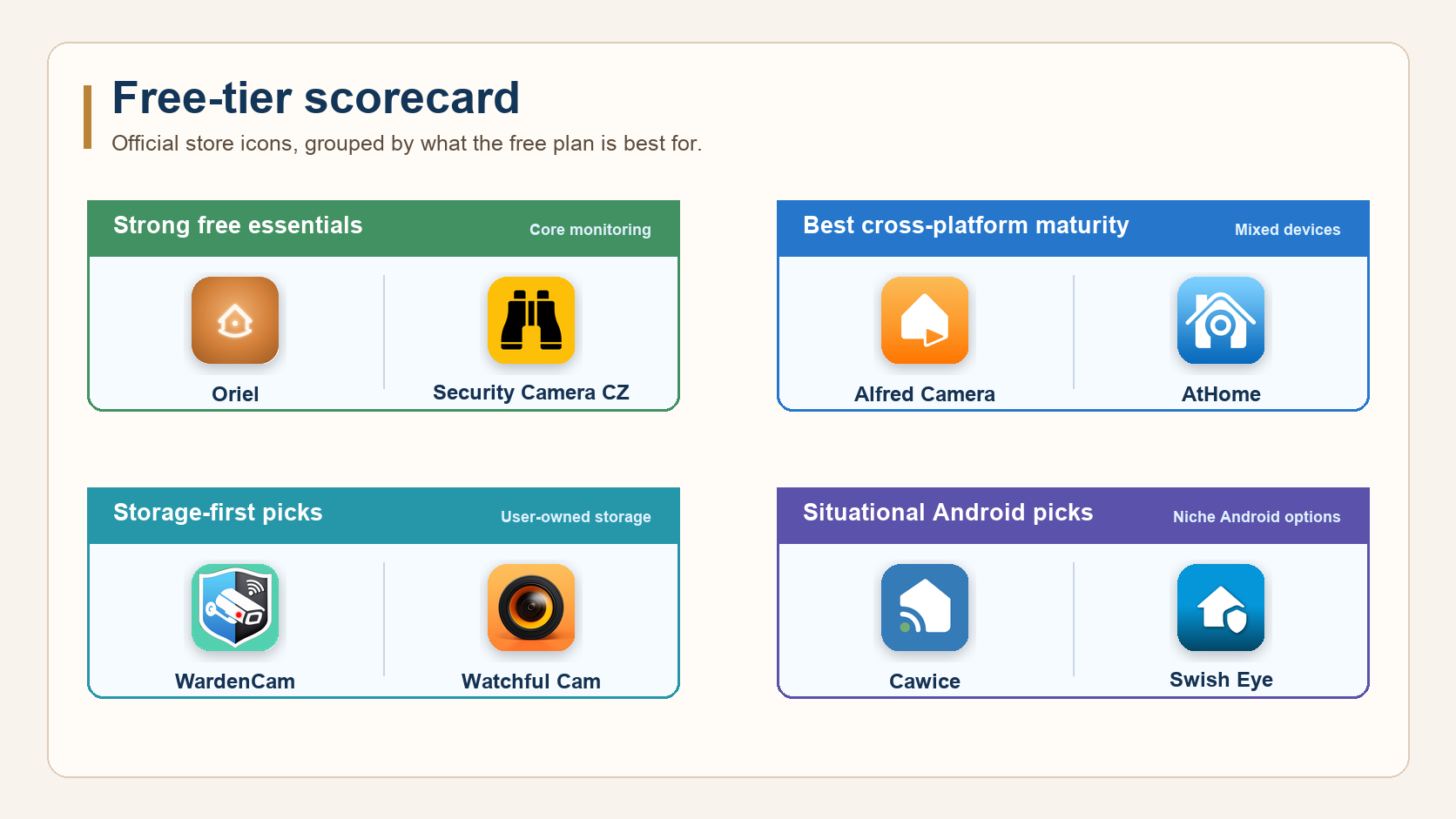
| App | Best For | Platforms | Free Playback | Upgrade Model | Current Footprint |
|---|---|---|---|---|---|
| Oriel | iPhone users who want free essentials | iOS; Android planned | Yes | Premium roadmap for advanced features | New |
| Alfred Camera | Mature iOS + Android ecosystem | iOS, Android | Premium required for newer users | Subscription | 90M+ families claimed on App Store; 109K iOS ratings |
| Security Camera CZ | Android users who want full features free | Android | Yes | Ads; paid ad removal | 1M+ Google Play downloads |
| AtHome Video Streamer | Phones + PC/Mac setups | iOS, Android, PC, Mac | Available, but app model is more complex | Freemium / in-app purchases | 5M+ Google Play downloads for Streamer |
| WardenCam | Google Drive / Dropbox recording | iOS, Android, Web Viewer | Yes after upgrade/trial model varies | One-time Pro upgrade | Official site says almost 5M Google Play downloads |
| Cawice | Simple Android camera + viewer setup | Android | Limited by tier | Premium subscription | 500K+ Google Play downloads |
| Swish Eye | Android users testing a newer lightweight option | Android | Yes, but free live-view session has limits | Premium for higher limits | 10K+ Google Play downloads |
| Watchful Cam | Apple-only users who prefer iCloud storage | iPhone, iPad, Mac | Uses device/iCloud storage | Monthly, annual, lifetime Pro | 135 US App Store ratings |
What "Free" Means in This Category
Most apps in this category are free to download. That does not mean they are free to use in the same way.
Some apps keep live viewing free but move recording playback behind Premium. Some include motion alerts but limit clip length, camera count, or live-view session length. Some are generous but include ads. Some store video in their own cloud, while others use your own Google Drive, Dropbox, iCloud, or local storage.
For a spare-phone security camera, the essential free features are:
- Live view when you want to check in.
- Motion detection so you do not need to watch constantly.
- Recording playback so you can understand what happened.
- At least one camera and one viewer device without a hardware purchase.
- A privacy model you can explain clearly.
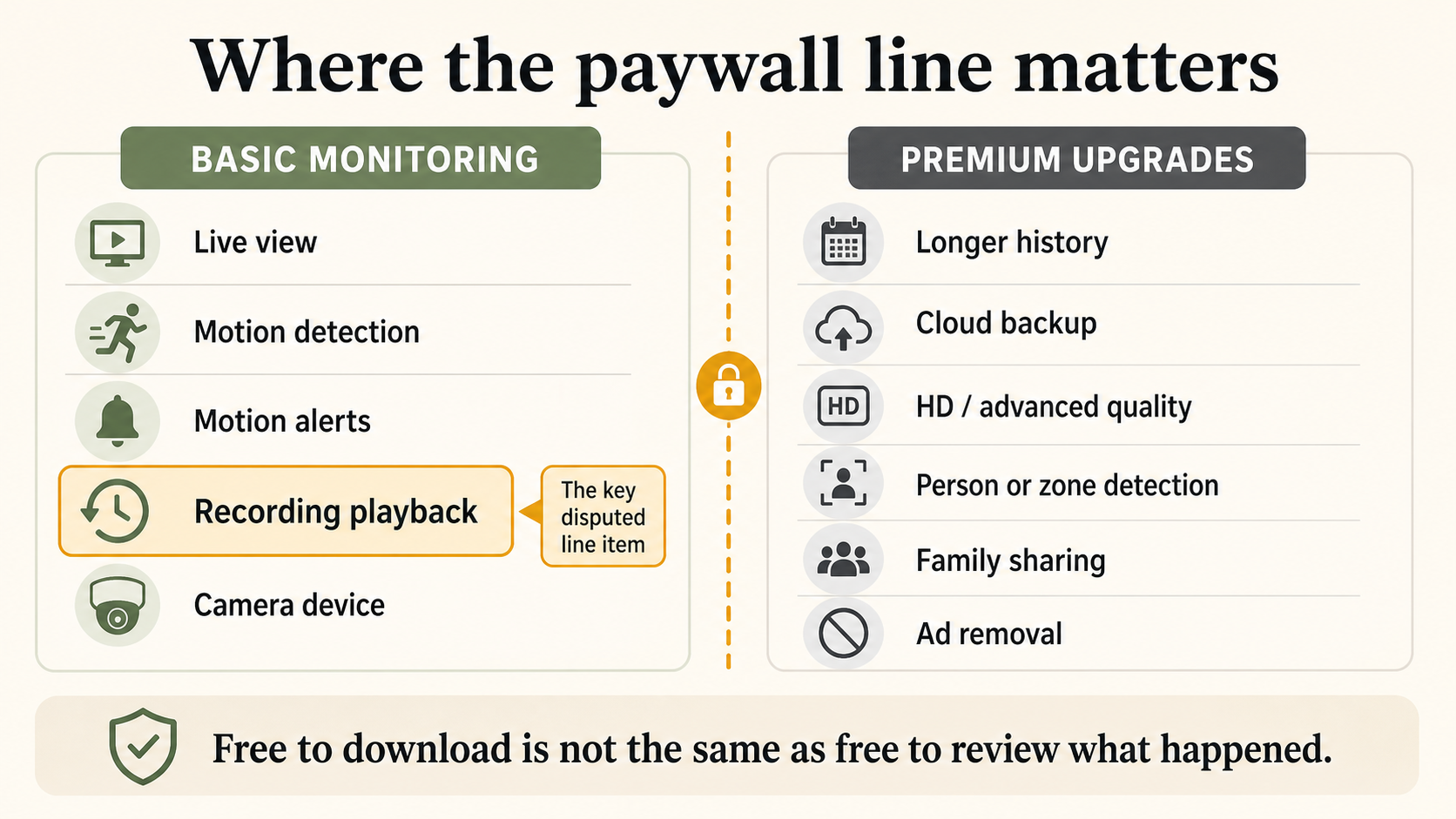
The biggest practical paywall is recording playback. If you only get a motion alert but cannot review the clip without subscribing, the free tier may not be enough for real home monitoring.
Detailed Reviews
Oriel
Best for: iPhone users who want free core home monitoring without a subscription.
Oriel is built for people who have a spare iPhone or iPad and want to use it as a home camera. The current free promise covers the essentials: live streaming, motion detection, recording playback, and multiple cameras. Oriel is iOS-first, with Android planned.
The privacy model is built around WebRTC. In normal conditions, live video is designed to stream peer-to-peer between your devices. In some network environments, the connection may use an encrypted relay path. The important distinction is that Oriel does not need to behave like a traditional always-cloud camera just to show a live view.
Free tier
- Live view.
- Motion detection.
- Recording playback.
- Multiple cameras.
Premium / future paid features
- Advanced detection features.
- Longer history or backup options.
- Convenience upgrades that do not redefine the basic app.
Pros
- Strong fit for old iPhones.
- Core monitoring features are not positioned as subscription-only.
- Privacy story is easier to explain than a cloud-first app.
Cons
- iOS-first; Android is not available yet.
- Smaller ecosystem than mature cross-platform apps.
- New product, so it does not have the same public review volume as older competitors.
Skip if: You need Android camera devices today or you want the largest established user community.
Alfred Camera
Best for: Mixed iOS + Android households that want the most established ecosystem.
Alfred Camera is the market leader in this category. Its App Store listing says more than 90 million families use AlfredCamera, and the US App Store listing showed about 109K ratings at 4.8 when checked. It supports iOS and Android, has a mature setup flow, and offers a broad feature set for baby monitoring, pet monitoring, property checks, and general home security.
The trade-off is the paywall line. Alfred's help center says accounts created on or after November 28, 2023 require Premium to access Event and Playback viewing features. Alfred also announced 2026 pricing changes: new Premium Standard annual pricing in the US moved from $29.99/year to $35.99/year starting March 16, 2026, while monthly Premium remains listed around $5.99 in app-store and payment references.
Free tier
- Live view.
- Basic monitoring features.
- Strong cross-platform setup.
Paid limits
- Event and playback viewing require Premium for newer users.
- HD, AI/person detection settings, expanded storage, and ad removal are Premium features.
Pros
- Mature and widely used.
- Works across iOS and Android.
- Strong recognition and support footprint.
Cons
- Playback is not a free core feature for newer users.
- Subscription cost matters if you only need a basic spare-phone setup.
- App-store privacy labels include tracking and linked data categories, so privacy-sensitive users should review the listing carefully.
Skip if: You mainly need free recording playback and do not want a subscription.
Security Camera CZ
Best for: Android users who want the most generous free-tier feature set.
Security Camera CZ is Android-only, but its free tier is unusually clear. The Google Play listing says the app is free to use including all features, and that the free and paid versions have the same functions. The main difference is ads: the paid version removes them.
Its listing includes motion detection, alerts, live streaming, two-way communication, Google Drive storage, IP camera mode, and camera sharing. Google Play showed 1M+ downloads and about 16.7K reviews when checked.
Free tier
- Live streaming.
- Motion detection.
- Motion alerts.
- Two-way audio.
- Multiple cameras.
- Google Drive storage support.
Paid limits
- Paid version removes ads.
Pros
- Strongest Android-only free-tier story.
- Clear "same features, ads difference" positioning.
- Good fit for users who dislike subscriptions.
Cons
- Android only.
- Contains ads.
- Not useful for iPhone households unless they already have Android camera devices.
Skip if: You need iOS support.
AtHome Video Streamer
Best for: Households that want to use phones and computers as cameras.
AtHome is broader than most phone-only options. Its Google Play listing says AtHome Camera turns more than 30 million devices into a monitoring system, and the Streamer listing supports phones, PCs, iPhones, and smart TVs. It uses a two-app model: one app on the camera device and another viewer app on the device you use to watch.
AtHome advertises encrypted connections and P2P transfer technology. It also lists human sensing, GIF alerts, time-lapse recording, pan/tilt support for compatible cameras, and PC support.
Free tier
- Camera and viewer setup through separate apps.
- Live monitoring.
- Alerts and monitoring features depending on platform/app combination.
Paid limits
- Pricing and limits vary by app, region, and platform.
- Some cloud or advanced features may require in-app purchases.
Pros
- Broadest platform support in this comparison.
- Useful if you want to include a PC or Mac.
- Mature product with large install footprint.
Cons
- More confusing setup because camera and viewer apps are separate.
- Harder to summarize free limits cleanly across platforms.
- Interface and pricing clarity are less straightforward than simpler apps.
Skip if: You want the simplest two-phone setup.
WardenCam
Best for: People who want recordings in Google Drive or Dropbox.
WardenCam's strongest idea is storage ownership. Its docs say video logs are saved in a WardenCam folder inside Dropbox or Google Drive, and its manual describes a Pro upgrade available for a one-time fee. The official site says WardenCam has achieved almost 5 million downloads from Google Play.
This makes WardenCam different from apps that put recording history in their own paid cloud. If you already pay for Google Drive or Dropbox, that storage model may feel easier to trust and budget.
Free tier
- Trial / basic use varies by store and account state.
- Camera viewing and recording workflow built around external storage.
Paid limits
- Pro upgrade is described as a one-time fee in the manual.
Pros
- Uses your own Google Drive or Dropbox.
- Good fit for users who prefer external storage over proprietary cloud.
- Cross-platform support plus web viewer.
Cons
- Setup depends on third-party storage account permissions.
- Official store footprint data is less clean than Google Play listings.
- Interface and docs feel older than newer competitors.
Skip if: You do not want to connect Google Drive or Dropbox.
Cawice
Best for: Android users who want a simple camera/viewer setup with Google account pairing.
Cawice turns an old Android phone into a security camera, baby monitor, or pet cam. Its Google Play listing says setup uses two phones signed in with the same Google account. It lists live streaming, two-way talk, motion and sound detection, instant alerts, automatic recording, alarm, and multi-user mode.
The privacy section says Cawice uses peer-to-peer protocol for streaming and SSL encryption, with recordings stored locally or in the user's Google Drive account. The listing showed 500K+ downloads and about 5.5K reviews when checked.
Free tier
- Live video streaming.
- Two-way talk.
- Motion and sound detection.
- Alerts.
Paid limits
- Developer replies describe Premium as including automatic video recording, people detection, HD video quality, no ads, and unlimited cameras.
Pros
- Easy Android pairing.
- P2P and Google Drive story is clearer than many small apps.
- Good for simple one-camera use.
Cons
- Automatic recording is tied to Premium based on developer replies.
- Android only.
- Smaller and less recently updated than the market leader.
Skip if: You need free automatic recording as a core requirement.
Swish Eye
Best for: Android users who want to test a lightweight newer option.
Swish Eye is a smaller Android security camera app. Its Google Play listing says it supports motion detection, live monitoring, smart alerts, cloud storage, video recording, camera sharing, two-way audio, siren, QR-code pairing, and old Android devices.
The most useful free-tier detail appears in a developer reply to a user review: the developer says free users can watch live from a camera for 30 minutes straight, while Premium has a much higher limit. That makes Swish Eye clearer than apps that simply say "free" without explaining usage limits.
Free tier
- Live view with a session limit.
- Motion detection and alerts.
- QR-code pairing.
Paid limits
- Higher live-view limits.
- Premium support for heavier usage.
Pros
- Clear free live-view limit.
- Lightweight setup.
- Supports older Android versions.
Cons
- Much smaller install footprint than the other apps here.
- Android only.
- Users who need all-day monitoring may hit free-tier limits quickly.
Skip if: You need long continuous live view without interruption.
Watchful Cam
Best for: Apple-only users who prefer iCloud storage and newer devices.
Watchful Cam is a newer iPhone, iPad, and Mac option. Its App Store listing says footage is stored on the device or in the user's private iCloud storage. It supports live video feed, video or snapshot mode, time-lapse, motion detection with notifications, and adjustable storage duration.
The trade-off is OS support and pricing. The US App Store listing requires iOS 17, iPadOS 17, or macOS 14, which excludes older iPhones that many people might want to reuse. In-app purchase listings showed monthly, annual, and lifetime Pro options.
Free tier
- Apple-device monitoring with local/iCloud storage.
- Live feed and motion features depending on plan.
Paid limits
- Watchful Pro monthly, annual, and lifetime options.
Pros
- Strong Apple ecosystem fit.
- Private iCloud storage is easy to understand.
- Supports Mac as well as iPhone and iPad.
Cons
- Requires iOS 17 or later.
- Paid plans are materially more expensive than some old-phone camera alternatives.
- Smaller review footprint than mature competitors.
Skip if: Your spare phone is older than iOS 17.
The Paywall Line: Basic Monitoring vs. Upgrades
The fairest way to compare these apps is not "free vs. paid." Every app needs a sustainable business model. The real question is where the paywall starts.
Basic monitoring features
- Live view.
- Motion detection.
- Motion alerts.
- Recording playback.
- One or more camera devices.
Reasonable premium upgrades
- Longer history.
- Cloud backup.
- HD or advanced quality settings.
- Person, pet, package, or zone detection.
- More automation.
- Team or family sharing.
- Ad removal.
The most user-friendly model keeps basic monitoring usable without a subscription, then charges for scale, convenience, storage, or advanced intelligence. The most frustrating model lets you install and receive alerts for free, then asks you to pay when you try to understand what happened.
Which App Should You Choose?
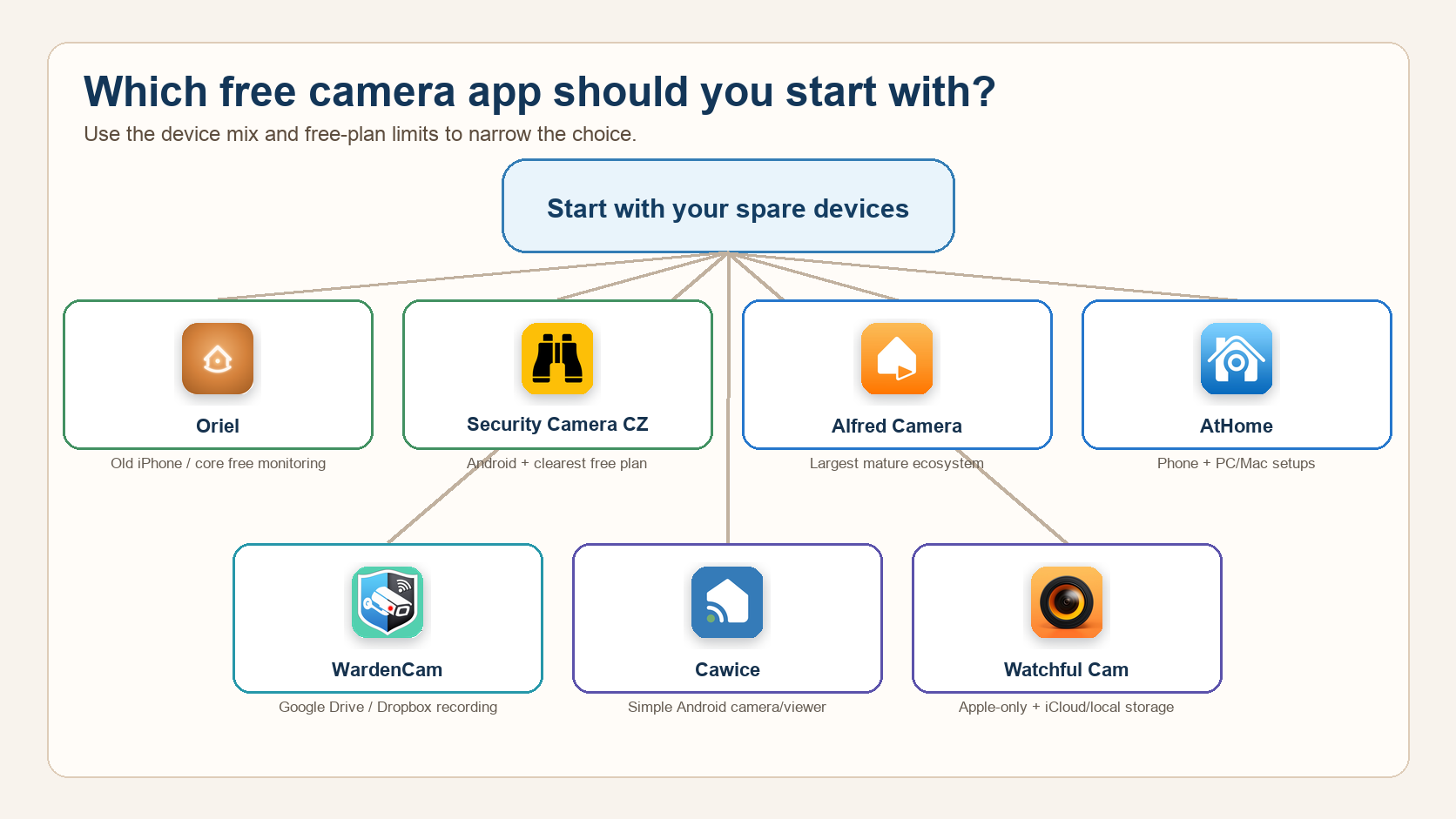
Choose Oriel if you use iPhones and want core security camera features without a subscription.
Choose Security Camera CZ if you are Android-only and want the strongest free feature set, accepting ads as the trade-off.
Choose Alfred Camera if you need the most mature iOS + Android ecosystem and are comfortable paying for playback and Premium features.
Choose AtHome if you want to include PCs, Macs, or a wider set of devices.
Choose WardenCam if you want recordings stored in your own Google Drive or Dropbox account.
Choose Cawice if you want a simple Android setup and are comfortable paying for automatic recording or advanced features.
Choose Watchful Cam if you are Apple-only, already trust iCloud storage, and your spare device supports iOS 17 or later.
Choose Swish Eye only if you are testing lightweight Android options and understand the free live-view session limit.
Privacy Models Compared
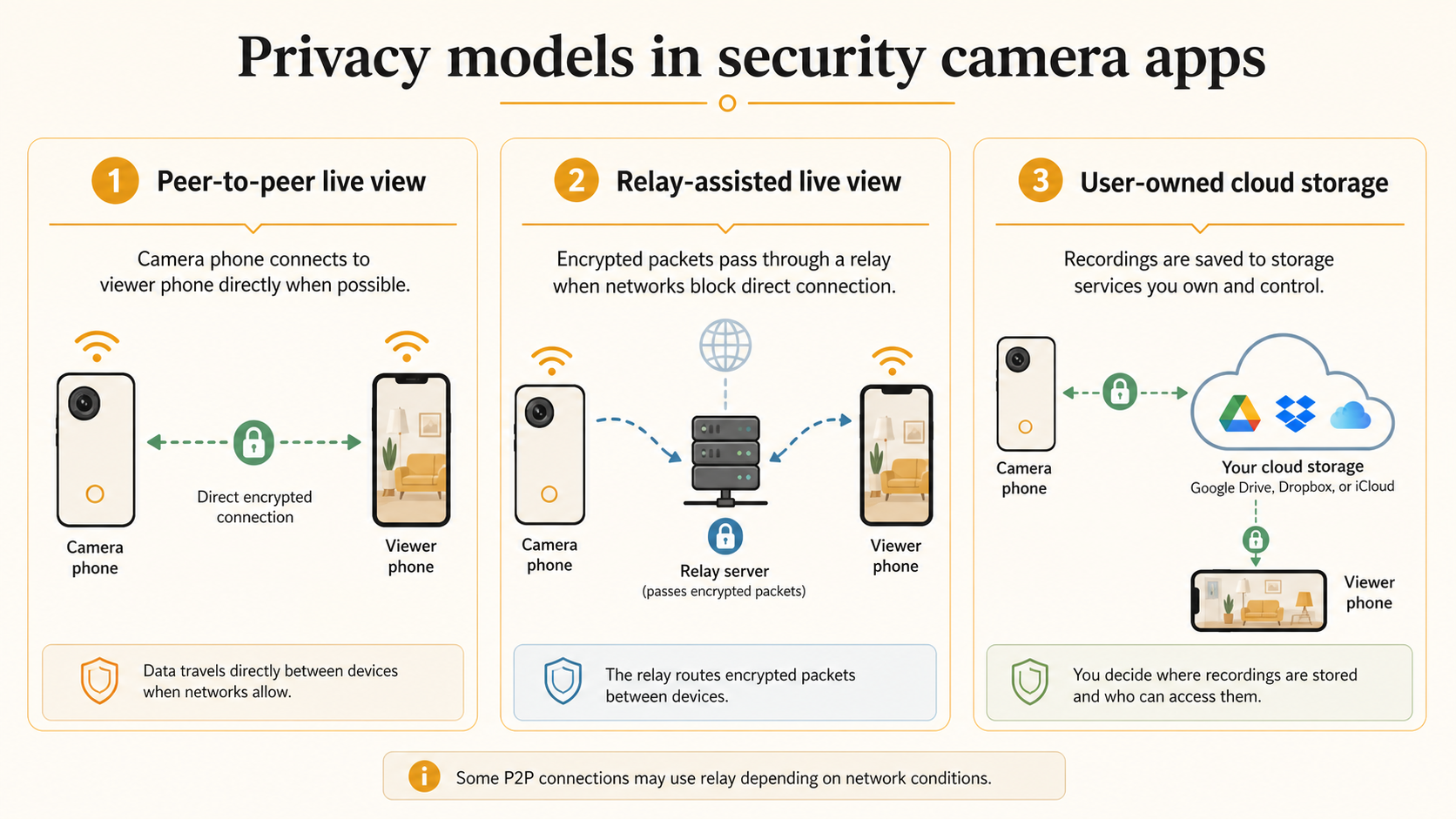
Security camera apps handle video in different ways:
- Peer-to-peer live view: Video is designed to travel directly between your devices when possible.
- Relay-assisted live view: A relay server helps connect devices when networks block direct connections.
- App cloud storage: Recordings are stored by the app provider.
- User-owned cloud storage: Recordings are stored in Google Drive, Dropbox, or iCloud.
- Local storage: Recordings stay on the camera device unless exported or backed up.
Oriel uses WebRTC for live connections. WebRTC uses ICE to find a working path between devices and may use STUN or TURN servers depending on network conditions. A direct connection is preferred when possible, while a relay candidate can be used when needed. That is why any honest P2P claim should include the caveat that some connections may be relayed.
Apps We Removed or Would Not Recommend as Primary Picks
EyesPie
EyesPie appeared in older comparison lists, but we would not keep it in the main 2026 recommendation table. Current live searches show discontinued references and third-party archive pages rather than a reliable official App Store or Google Play listing.
For a security camera recommendation, store availability matters. Users should not be sent to a discontinued or hard-to-verify app when safer current alternatives exist.
FAQ
Can I really use an old phone as a security camera?
Yes. Most apps in this list use two devices: one old phone as the camera and one current phone as the viewer. The camera device should stay plugged in because live streaming and motion detection drain battery quickly.
Which free security camera app has the best free tier?
For Android, Security Camera CZ has the clearest free-tier claim because its Google Play listing says all features are included in the free version and the paid version mainly removes ads. For iPhone users, Oriel is designed around keeping core monitoring features free.
Which app is best for iPhone users?
Oriel is the better fit if you want to reuse an old iPhone and keep basic monitoring features free. Watchful Cam is also Apple-only, but it requires iOS 17 or later, which excludes many older spare iPhones.
Which app is best for Android users?
Security Camera CZ is the strongest Android-only pick if your priority is a generous free tier. Cawice and Swish Eye are alternatives, but their free limits and smaller footprints make them more situational.
Which app is best for mixed iPhone and Android households?
Alfred Camera is the most mature mixed-platform option. AtHome and WardenCam also support cross-platform use, but setup and storage models are more complex.
Is recording playback usually free?
Not always. Many apps are free to download and free for live view, but recording playback is often limited, interrupted by ads, or moved into a paid plan. This is the most important feature to check before choosing an app.
Are P2P security camera apps always direct?
No. P2P apps usually try to connect devices directly, but some network conditions require a relay server. That does not automatically mean the app can read your video, but the app should explain how encryption, relay, and storage work.
Source Notes
Last verified on 2026-05-20.
- Oriel product page: https://oriel.camera/
- Alfred App Store listing: https://apps.apple.com/us/app/alfred-camera-home-security/id966460837
- Alfred recording playback policy: https://support.alfred.camera/hc/en-us/articles/6414982320666-Important-Update-to-AlfredCamera-s-Recording-Viewing-Features
- Alfred 2026 pricing update: https://support.alfred.camera/hc/en-us/articles/10298874147482-Important-Update-to-AlfredCamera-s-2026-Plan-and-Pricing
- Security Camera CZ Google Play listing: https://play.google.com/store/apps/details?id=cz.scamera.securitycamera
- AtHome Video Streamer Google Play listing: https://play.google.com/store/apps/details?id=com.ichano.athome.avs
- AtHome Video Streamer App Store listing: https://apps.apple.com/us/app/athome-video-streamer-diy-cctv/id590416158
- WardenCam official site: https://www.wardencam360.com/about.html
- WardenCam manual: https://wardencam-manual.readthedocs.io/en/latest/trial%26upgrade.html
- WardenCam storage docs: https://wardencam-manual.readthedocs.io/en/latest/web.html
- Cawice Google Play listing: https://play.google.com/store/apps/details?id=com.cawice.android
- Swish Eye Google Play listing: https://play.google.com/store/apps/details?id=com.swish.eye
- Watchful Cam App Store listing: https://apps.apple.com/us/app/security-camera-watchful-cam/id6451049580
- WebRTC specification reference: https://www.w3.org/TR/webrtc/